Handling JavaScript-Rendered Pages in AI Ingestion Pipelines
Silent failures in JavaScript-rendered pages break AI crawlers without triggering errors.

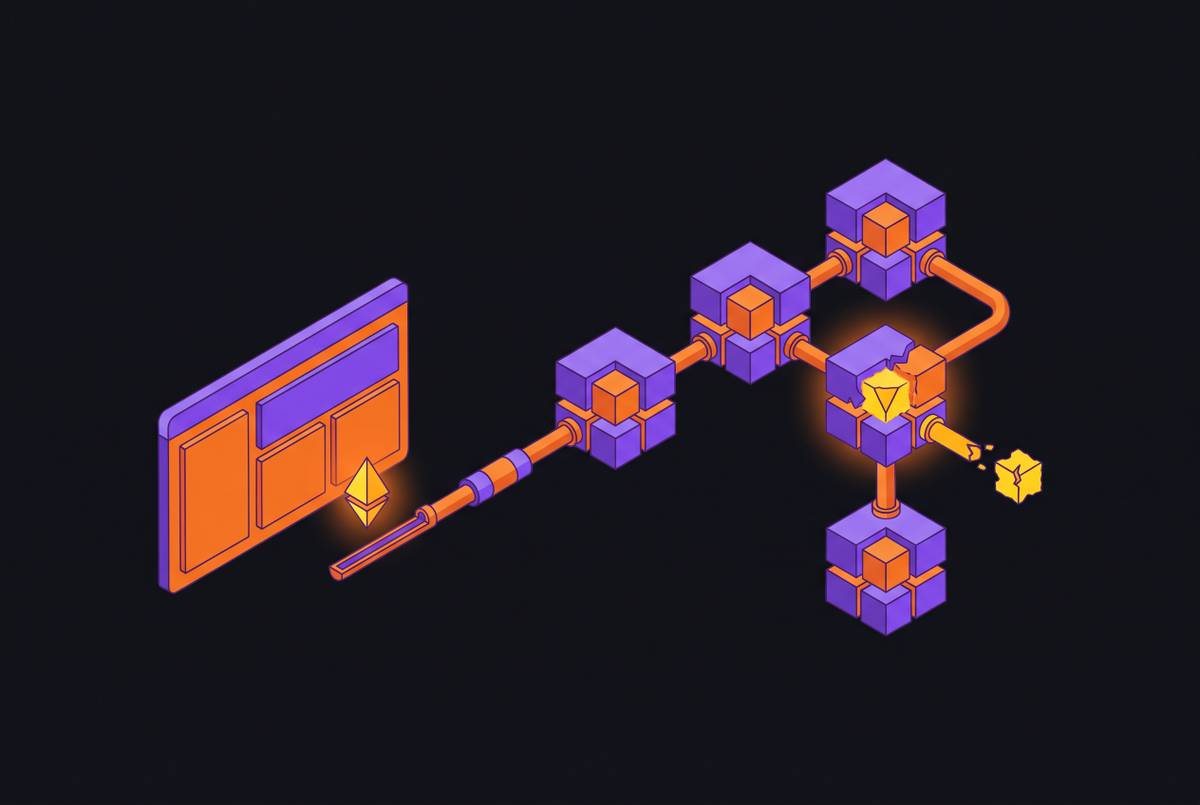
Three distinct things go wrong when a pipeline meets a JavaScript-heavy page, and all three fail silently. No error gets thrown, no retry kicks in. The pipeline just gets handed the wrong document and moves on like nothing happened.
Content invisibility is the most basic version. The crawler fetches the page before any script runs, so nothing JavaScript injects, prices, reviews, article text, ever shows up in what gets captured. The crawler works fine; the timing is what's off.
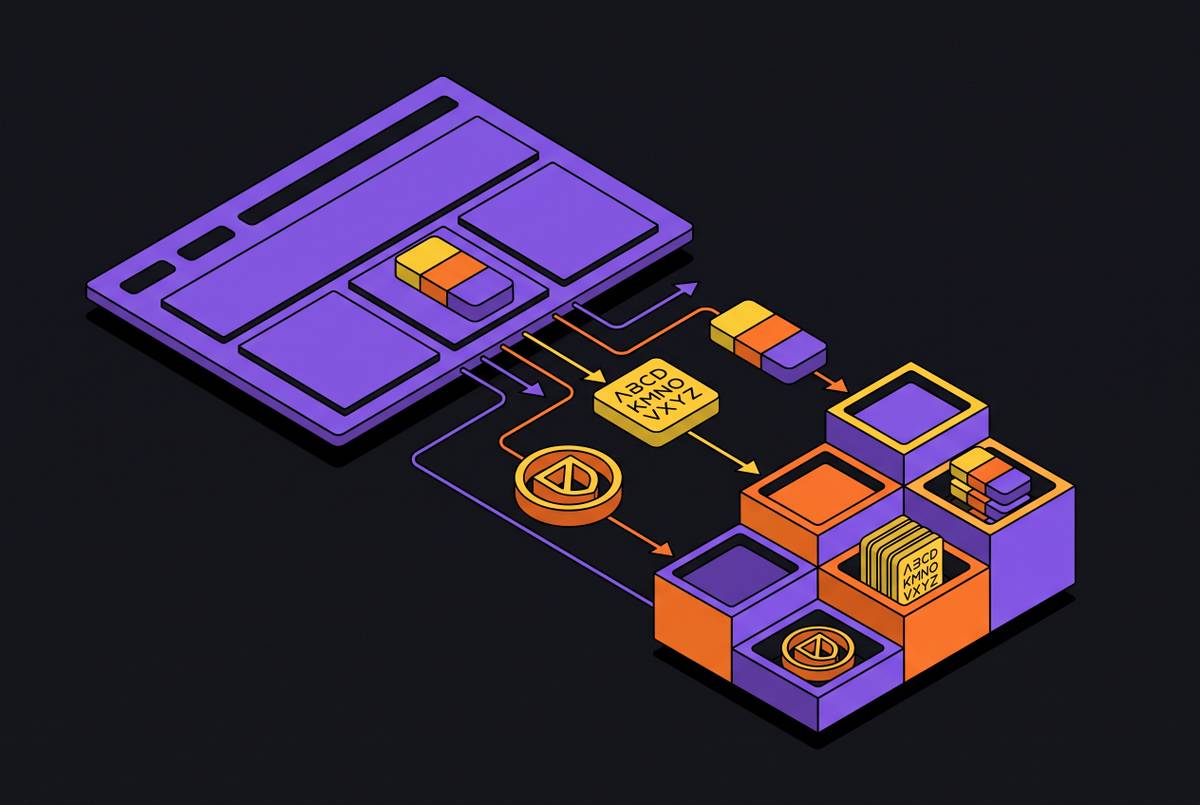
Schema-only data is the sneakier version, and the sneakiness is the whole point. A lot of sites embed structured data as JSON-LD, using schema.org's vocabulary, to describe products, articles, or reviews in machine-readable form. That's supposed to be the AI crawler's best friend. But when that JSON-LD only gets written into the page after React mounts, a crawler that skips JavaScript never sees it. Same underlying problem, different disguise.
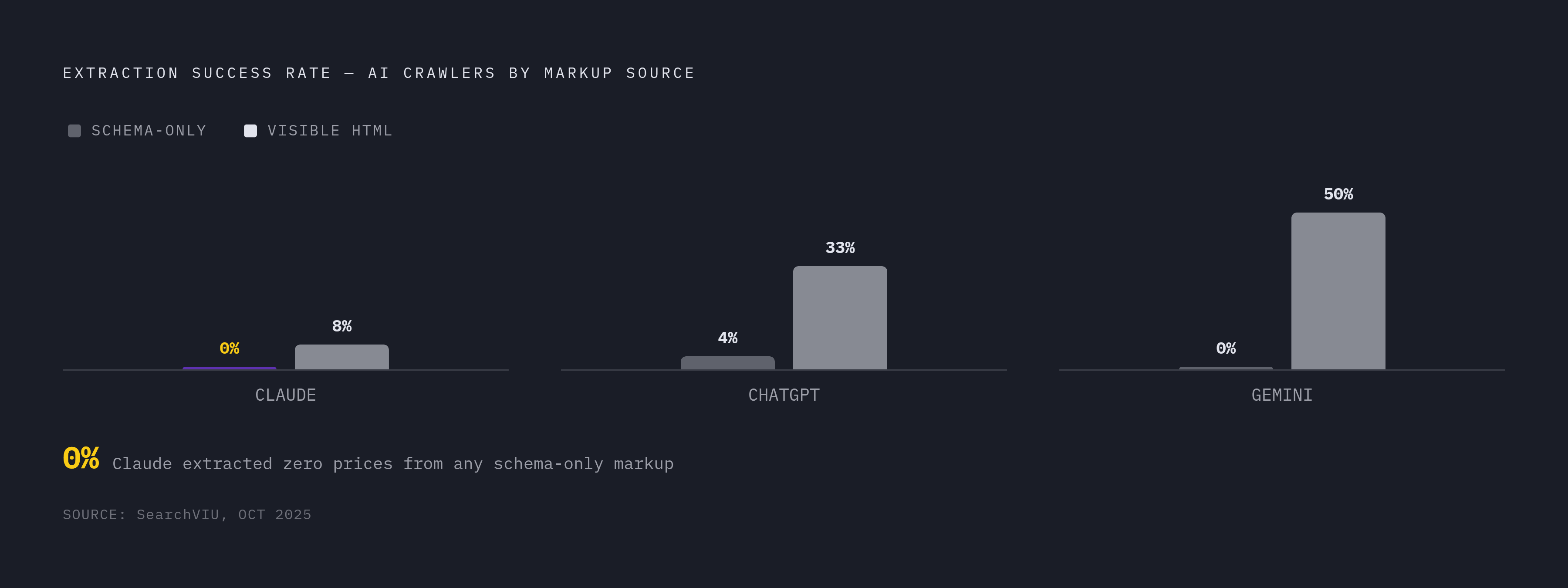
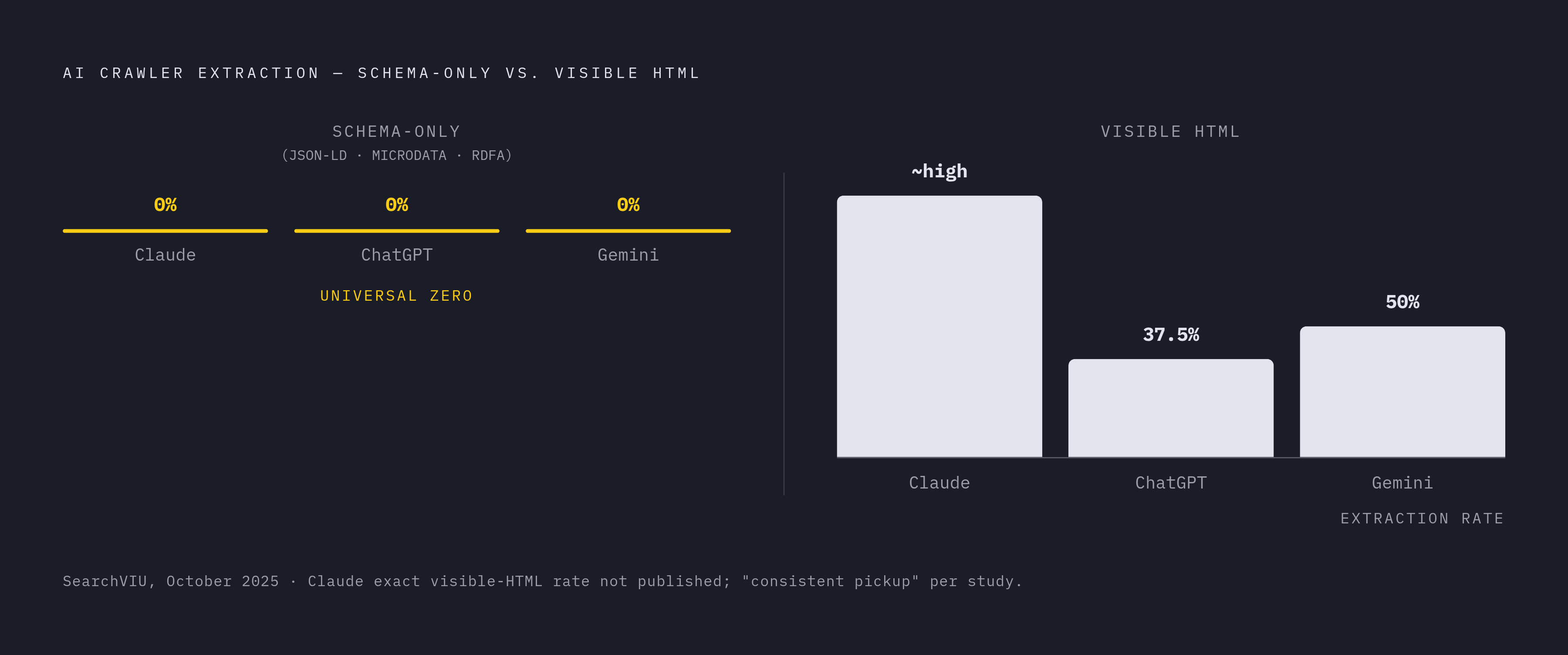
A SearchVIU study from October 2025 put numbers on this, and the numbers say the quiet part out loud: schema-only markup is close to worthless if a crawler can't run JavaScript. Pages where data lived only in JSON-LD, Microdata, or RDFa saw close to zero successful extraction by AI crawlers, while pages with the same data written into visible, well-structured HTML got picked up consistently. Claude pulled zero prices out of any schema-only format, full stop. ChatGPT managed a 37.5% success rate, with nearly all of it coming from visible HTML rather than the schema markup, and Gemini did best at 50%, but even Gemini struck out on every pure schema-only test. Adding JSON-LD as a backup doesn't solve the underlying issue. Structured markup only counts if it's already sitting in the HTML the server sends on first load; anything else is a bet against how these crawlers actually work.
Timing and race conditions show up even once a headless browser is in the mix. A page can load, look done, and still be missing half its content because a fetch call hadn't resolved, or a lazy-loaded image block hadn't scrolled into view. Infinite scroll, "load more" buttons that trigger a fresh API call, skeleton loaders that sit on screen for a second before real content swaps in: these are all common ways a pipeline grabs a half-finished page and never finds out.
What ties the three together is the silence. The pipeline doesn't crash, doesn't log a warning, and just quietly hands downstream systems a document missing the one part that mattered.
How headless rendering actually closes the gap, and where it still falls short
A headless browser runs the JavaScript, manages session state, builds the DOM the way a real browser would, and waits for the page to actually become the page a visitor would see. Research on arXiv found that agents built on Playwright pulled content out of client-side-rendered portals far more reliably than agents relying on lightweight HTTP clients, which only ever get the static shell the server sends on the first request.
Playwright has become the standard choice here. By 2025 and into 2026, it's largely replaced Selenium as the default: faster to run, with waiting and retry logic built in rather than bolted on, and support across Chromium, Firefox, and WebKit out of the box. The waiting logic matters most because it targets the timing failures directly. waitForSelector and waitForNetworkIdle let a developer say "don't extract until this specific thing exists," instead of guessing at a fixed delay and hoping the page loaded in time.
Crawlee, a JavaScript and TypeScript framework, is the newer entrant worth knowing. It blends plain HTTP scraping with headless browser rendering under one roof, and bundles in request queuing, proxy rotation, and session handling. Since 2024 it's picked up real adoption as a modern option built with headless support from the start, rather than added later as a patch.
None of this comes free, and the cost is the part teams tend to discover the hard way, usually after something falls over in production. A single Chromium instance eats a meaningful chunk of RAM, and running several in parallel can knock over a standard container without warning. Headless rendering is also slower than a plain HTTP request by a wide margin, which matters once ingestion volume climbs into the thousands or millions of pages. Headless browsers get flagged by anti-bot systems more often than plain HTTP clients too, since they leave a bigger fingerprint. Once any of this runs at scale, proxy rotation, session handling, rate limiting, and retry logic all become the development team's problem to own and maintain, indefinitely, with no point where the work is just done.
Here's the mistake most teams make: they treat "we added headless rendering" as the finish line. It solves the rendering problem, but it does nothing for the pipeline problem sitting right behind it, and conflating the two is exactly where engineering hours start bleeding into infrastructure instead of product. Closing that second gap is a separate architectural decision, and it's the one most teams skip.
Architectural choices for wiring rendering into an AI-native ingestion pipeline
The cleanest way to build this is as two separate stages: render first, extract second. Treating them as one step is where a lot of pipelines get into trouble, because a failure in rendering gets misread as a failure in extraction, and someone ends up debugging the wrong half of the system for hours.
Stage one, rendering, is just about getting the page to a stable, complete state: network idle, target elements actually present in the DOM. Stage two, extraction, works only on that finished DOM, never on the raw HTML the server first sent, and decisions about selectors and output format belong here. Keeping the two stages apart means each one gets tested and swapped out on its own, without the other one breaking in the process.
Selector choice has a real hierarchy, and skipping it is how a scraper breaks the week after a redesign ships. JSON-LD that's server-rendered into the HTML is the most durable option, since it's effectively a declared contract about what the data means. After that comes data-testid attributes, which developers tend to leave alone during redesigns since testing depends on them. Named class prefixes come next, with layout or visual classes as the least durable option on the list, the first thing to change the moment a designer decides the site needs a refresh. The rule that falls out of this: if JSON-LD is server-rendered, parse it straight from the HTML; if it only shows up after the page mounts, fall back to reading the rendered DOM instead.
Output format deserves its own decision, not an afterthought bolted onto the end. Raw HTML is loaded with tags, scripts, and styling that cost tokens without adding meaning; converting to clean Markdown instead cuts token use by a wide margin, with one estimate putting the reduction at up to 40% for RAG systems. For anything that needs structured extraction, a developer-defined JSON schema, in the style of Pydantic, is the right shape to ask for: the pipeline gets back exactly the fields it needs, not another document to parse all over again. Where JSON is the natural output but Markdown is what downstream systems expect, converting between the two can save something like 20 to 30% across a workflow that chains several model calls in sequence.
Anti-bot friction (proxy rotation, fingerprint randomization, CAPTCHA handling) belongs at the rendering stage, and it's worth treating as a swappable layer rather than something built by hand in-house. None of it differentiates a product; it's infrastructure that just needs to keep working. On the concurrency side, pooling browser instances keeps memory in check, a queue in front of the crawl workers keeps a rendering failure from blocking extraction elsewhere, and retry logic should live at the rendering stage specifically, contained rather than wrapped around the whole pipeline.
Why managed rendering APIs replace the headless infrastructure layer for most teams
Running headless infrastructure at scale carries a real tax, and it stays invisible until the bill comes due. Proxy rotation, rate limiting, concurrency limits, session handling, retries: all of this is genuine engineering work, and none of it ships a feature a customer will notice. Meanwhile, the sites on the other end keep improving their bot detection, so keeping up isn't a one-time build. That ongoing upkeep has no natural finish line, which is the part teams underestimate most going in.
A managed rendering API collapses most of that into a single call. Send a URL, and it runs the JavaScript, waits for the DOM to settle, and hands back clean output, with proxy and session management happening on the vendor's servers instead of a team's own containers. Latency stays predictable, and concurrency stops being a container-sizing exercise someone has to babysit.
The trade-off is worth naming plainly: a managed API means a vendor dependency and a cost per call. Most teams treat that as a downside to negotiate around; it's worth reading instead as the central design decision. Unless scraping infrastructure is the product, owning that stack in-house is a poor use of a small engineering team, and pretending otherwise is how three engineers end up maintaining a proxy fleet instead of shipping features. That's not a hypothetical risk. It's the default outcome of skipping this decision, and it happens quietly enough that nobody notices until a hiring plan gets built around headcount that should've gone to product work.
Evaluating rendering APIs for AI pipeline use: what the options actually deliver
Generic scraping tools and AI-pipeline tools get judged on different things. A handful of criteria matter specifically for feeding an LLM or an agent, rather than for scraping in general.
Output format comes first: does the API hand back Markdown that's ready to feed a model, or does the developer still need to clean raw HTML afterward? Structured extraction is next: can a developer define a JSON schema and get typed fields back, instead of another blob of text to parse? Latency matters differently depending on the use case; a synchronous agent tool call needs speed measured in a few hundred milliseconds, while a batch ingestion job can tolerate a slower, async approach. Integration surface matters too: does the API expose a plain REST endpoint, an MCP interface, or an SDK that fits how an agent calls tools? Pricing model, whether it's per call, per credit, or tiered by volume, needs to line up with how much the pipeline actually runs.
Most vendor comparisons treat this as a features checklist where everyone scores points. The real split worth drawing is between tools built for network access and tools built for AI ingestion, and confusing the two is how a team ends up with clean proxy coverage and garbage model output.
One option built specifically for the second category is worth naming directly: it returns clean Markdown in around 247 milliseconds, on a flat per-call pricing model, and offers native MCP support, so an agent can call it as a tool with no wrapper layer in between. It fits teams that use a dedicated rendering API as the data layer under their own AI products. It fits best for a team that wants to replace a patchwork of scrapers, crawlers, and data vendors with one API built specifically for AI ingestion.
Bright Data and Oxylabs sit at the other end of the spectrum, built around enterprise-grade proxy networks and deep geographic targeting. They fit when the binding constraint is network-level access and location coverage, and they fit poorly when the priority is clean, LLM-ready output straight out of the box, because that isn't what they're built to produce. Zyte occupies a similar enterprise lane, built for SLA-backed crawls against sites with heavy protection; it's a strong fit for large, compliance-heavy operations, and more infrastructure than most early-stage AI pipelines need on day one.
Picking a vendor because it's the biggest name is a mistake dressed up as a safe choice, and it's a common one. No option here wins across every use case. The right call depends on matching output format, structured extraction support, and integration style to what the pipeline actually needs, and on being honest about whether a team wants to own that infrastructure or hand it to someone who already runs it at scale.
Grounding RAG systems with JS-rendered content: the freshness and cleanliness requirements
A 2024 Stanford study found that Lexis+ AI and Ask Practical Law AI, two legal AI research tools, produced incorrect information more than 17% of the time when answering legal queries. That number is a useful stand-in for what happens more broadly once retrieval quality slips: the model isn't guessing randomly. It's confidently wrong because what it retrieved was wrong, incomplete, or missing outright.
Freshness is one half of that problem. Every LLM has a training cutoff, and a user asking about anything that happened after that date gets a confident, fluent, wrong answer if the system has no other way to find current information. That's less a hallucination in the usual sense and more a mismatch between what the model knows and what the question needs. Live crawling, done with proper JavaScript rendering, is the mechanism that keeps a RAG index from going stale, and an index built on old renders puts a ceiling on quality that no amount of tuning retrieval or generation can lift.
Cleanliness is the other half. A retrieval step can only surface chunks as relevant as the document it's pulling from. Feed it a document full of navigation menus, empty divs, and half-rendered skeleton loaders, and the chunks it finds will carry the same noise straight through to the model's answer.
Here's the part that gets skipped over: the search or retrieval step in a RAG system queries a snapshot that already exists, built ahead of time from crawled pages. Even a flawless generation step can't recover information that never made it into the index in the first place, because the page was empty when it got crawled, or the render was stale. Getting the rendering right isn't one improvement among many on a checklist. It's the precondition that decides whether every other improvement in the pipeline counts for anything at all.
Putting it together: a reference pipeline for JS-rendered page ingestion
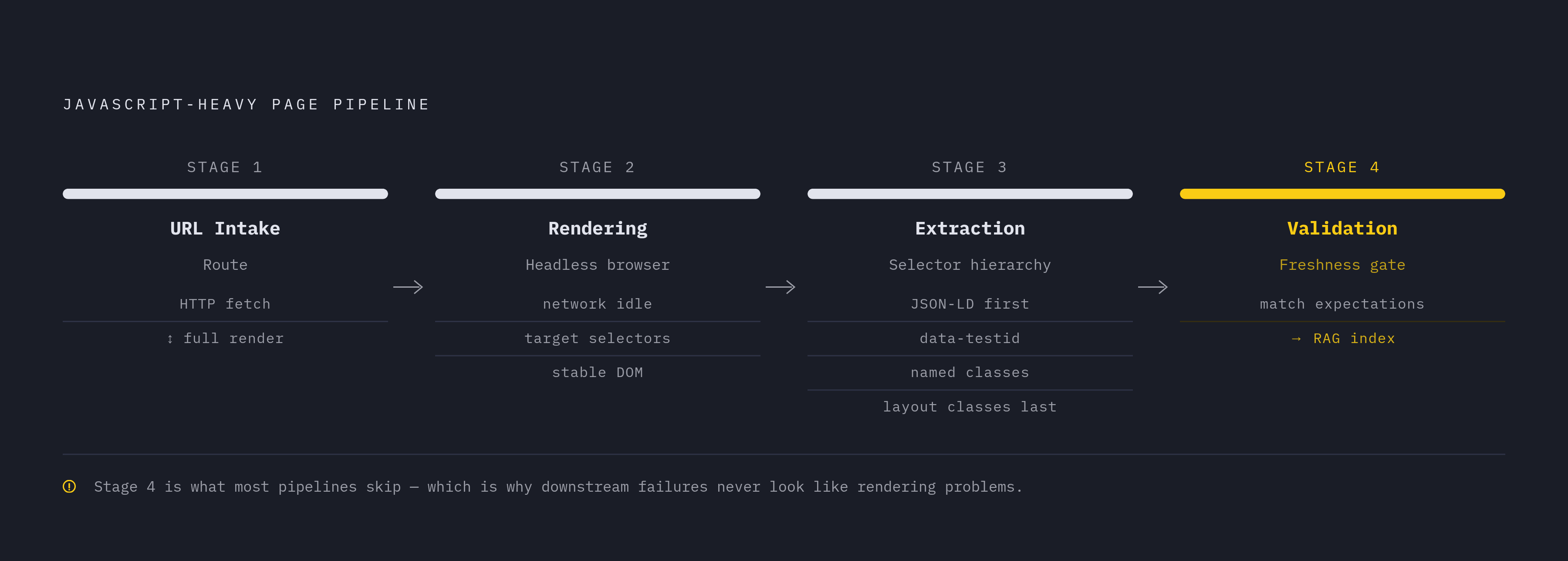
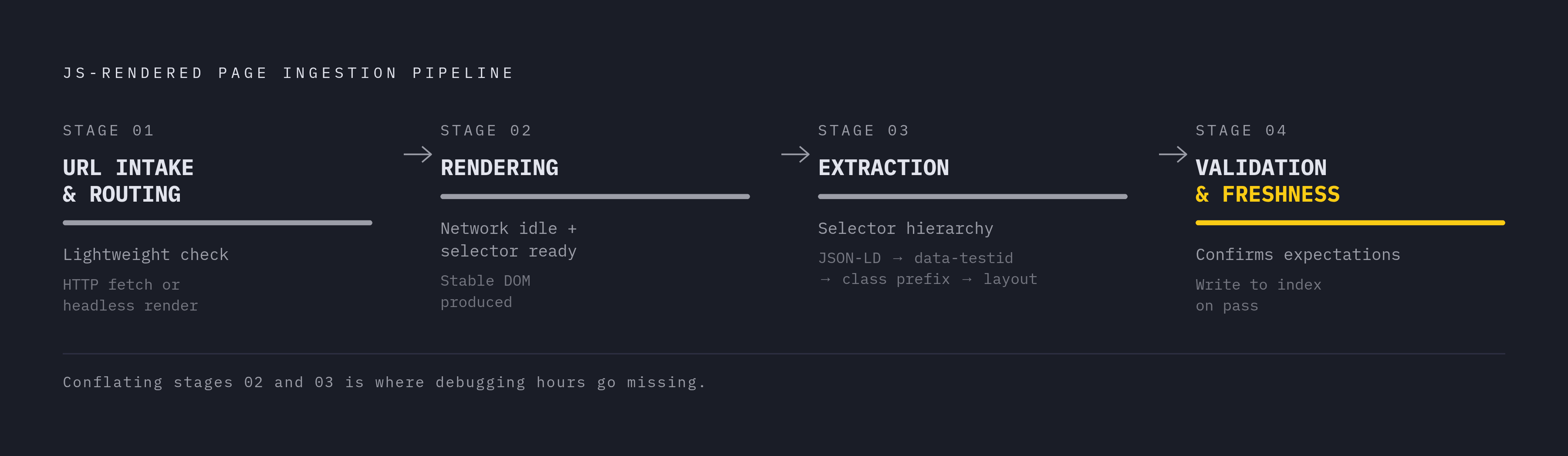
A pipeline built to handle this well tends to follow the same basic shape, regardless of which specific tools sit inside it.
Stage one is URL intake and routing. Before spending resources on rendering, the pipeline needs to decide whether a given URL even requires it. Not every page is JavaScript-heavy, and static pages waste time and money if they get pushed through a full headless render for no reason. A lightweight check, or a known list of site patterns, routes pages to either a fast HTTP fetch or the full rendering path.
Stage two is rendering itself, where a headless browser or a managed rendering API takes over, waits for network idle and for target selectors to show up, and produces a stable, complete DOM.
Stage three is extraction, pulling structured fields or clean Markdown out of that finished page, using the selector hierarchy that favors JSON-LD and stable attributes over classes tied to visual layout.
Stage four is validation and freshness checks, confirming the extracted content actually matches what's expected, before it ever gets written into an index a RAG system will later depend on.
Skip any one of these stages, and the downstream failure won't look like a rendering problem, even though the model did everything right with the document it was handed. The document was just never the right one to begin with.